Best AI Meeting Note Takers for Teams, Zoom and In-Person Meetings (2026)
This post contains affiliate links. If you buy through them, AIDailyShift may earn a commission at no extra cost to you.
If you spend half your week in meetings, an AI note taker can give you back the hour you’d otherwise spend writing up notes and chasing actions. The good ones join your Teams or Zoom call (or listen through your computer), produce a transcript, then hand you a summary with decisions and to-dos when the call ends.
There are now dozens of these tools, and pricing has shifted a lot in 2026. This guide compares the best AI meeting note takers for Microsoft Teams, Zoom and in-person meetings, including which have a genuinely useful free plan. We’ve based it on each company’s official pricing and feature pages rather than marketing claims. Prices checked October 2026. Most of these tools price in US dollars, so UK prices may differ slightly once VAT and currency are applied.

Quick answer: the best AI note taker for most people
- Best overall: Fireflies.ai, which works across Zoom, Teams, Google Meet and more, with a free plan and paid plans from $10 per seat a month (billed annually).
- Best free AI note taker: Fathom, whose free plan includes unlimited recordings and transcriptions with instant AI summaries.
- Best for Microsoft Teams: Microsoft 365 Copilot, built into Teams, Outlook and Word, from £16.10 per user a month (annual).
- Best for Zoom: Zoom’s own AI Companion, included free with paid Zoom Workplace plans.
- Best bot-free option: Granola, which captures audio from your device so no bot joins the call.
- Best for in-person meetings: the Plaud NotePin wearable recorder, with 300 free transcription minutes a month.
How AI meeting note takers work
There are three main types, and choosing the right one matters more than choosing a brand:
- Meeting bots (Fireflies, Otter, tl;dv, Fathom): a “notetaker” joins the call as a participant, records it and processes the audio afterwards. They work across platforms but everyone can see the bot.
- Built-in assistants (Copilot in Teams, Zoom AI Companion): AI is part of the meeting app itself. There’s no extra bot, but you need the right licence and the host’s settings must allow it.
- Device-audio and hardware recorders (Granola, Plaud): they capture sound from your computer or from a small recorder in the room. They’re ideal for in-person meetings and for people who don’t want a bot in every call.
Whatever you choose, tell people you’re recording. Several of these tools build in notifications for exactly this reason, and it’s the polite (and in many workplaces, required) thing to do under UK GDPR.
Comparison table: best AI meeting note takers 2026
| Tool | Works with | Free plan | Paid from (per user/month) | Best for |
|---|---|---|---|---|
| Fireflies.ai | Zoom, Teams, Google Meet and 10+ more | Yes (limited AI summaries, 400 mins storage) | $10 annual / $18 monthly | All-round teams |
| Otter.ai | Zoom, Teams, Google Meet | Yes (300 mins/month) | $8.33 annual / $16.99 monthly | Live transcripts |
| Microsoft 365 Copilot | Teams and Microsoft 365 apps | No (add-on) | £16.10 annual / £19.32 monthly | Microsoft-based businesses |
| Zoom AI Companion | Zoom | 3 meeting summaries/month on Basic | $14.16 annual / $16.99 monthly (Workplace Pro) | Zoom-first teams |
| tl;dv | Zoom, Teams, Google Meet | Yes | €18 annual / €29 monthly | Sales and customer calls |
| Fathom | Zoom, Teams, Google Meet | Yes (unlimited recordings) | $16 annual / $20 monthly (Premium) | Best free plan |
| Granola | Any call via device audio | Yes (limited history) | $14 (Business) | Bot-free notes |
| Plaud NotePin | In-person (plus Plaud Desktop) | 300 mins/month included | $159 device | In-person meetings |
The best AI note takers, reviewed
1. Fireflies.ai: best all-round AI note taker
Fireflies joins Zoom, Google Meet, Teams and more than ten other platforms. It can also record through a Chrome extension without a bot, and it has desktop and mobile apps. It supports transcription in 100+ languages, real-time notes, meeting search and an assistant called AskFred that answers questions about your calls.
Pricing: Free ($0, with limited AI summaries, 400 minutes of storage per team and 20 AI credits). Pro is $10 per seat a month billed annually ($18 monthly) with unlimited summaries, 8,000 minutes of storage per seat and video recording. Business is $19 billed annually ($29 monthly) with unlimited storage, conversation intelligence and team analytics. Enterprise is $39 per seat (annual only).
Pros: works almost everywhere; strong search and integrations; GDPR and SOC 2 Type II compliance listed.
Cons: the free plan’s storage fills up quickly; video recording needs a paid plan.
2. Otter.ai: best for live transcription
Otter has been around longer than most and is still one of the easiest ways to get a live transcript. It joins Zoom, Teams and Google Meet automatically, identifies speakers and offers AI chat across your meetings.
Pricing: Basic is free with 300 transcription minutes a month and 3 lifetime file imports. Pro is $16.99 a month billed monthly or $8.33 a month billed annually, with 1,200 minutes and meetings up to 90 minutes. Business is $30 a month monthly or $19.99 a month annually, with meetings up to 4 hours. Otter also advertises introductory discounts for first-time subscribers.
Pros: excellent live transcript; generous free minutes; 20% student and teacher discount on Pro with an .edu email.
Cons: transcription covers six languages (English, Spanish, French, German, Japanese and Chinese), fewer than some rivals; Pro caps meeting length at 90 minutes.
3. Microsoft 365 Copilot: best AI meeting notes for Teams
If your organisation already lives in Microsoft 365, Copilot is the natural choice for AI meeting notes in Teams. It works inside Teams, Outlook, Word, Excel and PowerPoint, and Microsoft describes it streamlining meetings with real-time summaries and insights. Its pre-built agents include Facilitator, which is designed to help run meetings. Because it’s grounded in your Microsoft 365 data, you can ask follow-up questions that pull in related emails and documents.
Pricing (UK): the Microsoft 365 Copilot Business add-on is £16.10 per user a month paid yearly, or £19.32 a month on monthly billing. Microsoft is running a first-year offer from £13.80 per user a month (annual commitment) until 31 December 2026. You need a qualifying Microsoft 365 business plan, or you can buy a bundle such as Microsoft 365 Business Premium with Copilot (£24.60 per user a month paid yearly).
Pros: no extra bot; strong security and admin controls; connects meeting notes to the rest of your work.
Cons: the most expensive option for individuals; only really makes sense if you use Microsoft 365.
4. Zoom AI Companion: best AI meeting notes for Zoom
For AI meeting notes on Zoom, start with what you already pay for. Zoom Workplace Pro ($14.16 per user a month billed annually, or $16.99 monthly) includes AI Companion at no extra cost, with unlimited meeting summaries, in-meeting questions and custom summary templates. The free Basic plan includes meeting summaries for 3 hosted meetings a month and 3 uses of My Notes, the note-taking feature that also works for in-person conversations and other meeting platforms.
Zoom also sells ZoomMate, an add-on AI assistant at $20 per user a month ($16.67 billed annually), with unlimited AI note-taking, agents, workflows and 2,200 AI credits a month. Most people only need the AI Companion features that come with Workplace Pro.
Pros: included with paid Zoom; no bot; quick summaries straight after the meeting.
Cons: focused on Zoom; the free tier is very limited.
5. tl;dv: best for sales and customer calls
tl;dv records Zoom, Teams and Google Meet calls and is popular with sales and customer success teams who want clips and highlights from calls. It has a free plan.
Pricing: Free (€0). Pro is €18 per seat a month billed annually (€29 monthly). Business is €29 per seat a month billed annually (€39 monthly). Prices are listed in euros.
Pros: free plan to start; good for sharing moments from calls.
Cons: euro pricing; the more advanced sales features sit on the Business plan.
6. Fathom: best free AI note taker
If you want a free AI note taker that doesn’t feel crippled, Fathom is the one to try first. Its free plan includes unlimited recordings and transcriptions, instant AI call summaries, clips and search across calls. You can also choose between bot capture and a bot-free option (in beta on Mac).
Pricing: Free forever. Premium for individuals is $16 a month billed annually ($20 monthly) and adds advanced summaries, AI action items and a conversational meeting assistant. Team is $15 per user a month annually ($19 monthly, two-user minimum) and Business is $25 annually ($34 monthly). Paid plans carry a 90-day guarantee.
Pros: the most generous free plan here; clear upgrade path.
Cons: AI action items and advanced summaries need Premium.
7. Granola: best bot-free AI note taker
Granola works differently. Instead of sending a bot, it captures audio from your device and combines it with any notes you type into an “AI notepad”. That makes it discreet and platform-agnostic: it works with whatever call app you use. There are desktop, iOS, Android and Apple Watch apps.
Pricing: Basic is free with AI meeting notes but limited meeting history. Business is $14 per user a month with unlimited notes and history, advanced AI models and integrations with Notion, HubSpot, Attio, Affinity and Zapier. Enterprise is $35 per user a month.
Pros: no bot in your calls; lets you add your own notes for context.
Cons: the free plan limits how far back you can see; because there’s no bot, remember to tell others you’re taking AI notes.
Best AI note takers for in-person meetings
Software bots can’t help when you’re in a meeting room, on a site visit or interviewing someone face to face. That’s where dedicated AI voice recorders come in. Both of the devices below work with the Plaud app, which transcribes in 112 languages with speaker labels and creates summaries from more than 10,000 templates.
Plaud NotePin: best wearable AI note taker
The NotePin is a small wearable recorder you can clip on, wear as a pin, on a wristband or as a necklace. Plaud quotes up to 20 hours of continuous recording, 40 days of standby, 64 GB of storage and a weight of 0.59 oz. Every device includes the free Starter plan with 300 transcription minutes a month. Note that the NotePin doesn’t record phone calls.

- Plaud Intelligence: Capture conversations in 112 languages and generate accurate transcripts with the Plaud App and Web….
- Global Security Privacy: Built to the highest standards with ISO 27001/27701, SOC 2, HIPAA, GDPR, and EN18031 compliance…
- Wearable Design for Hands-free Capture: Wear your device effortlessly with the 0.59 oz thumb-sized design. Plaud NotePin…
Plaud Note Pro: best for meetings and phone calls
If you also need to record calls, the credit-card-sized Note Pro has four MEMS microphones, a small AMOLED display and modes for in-person meetings and phone calls. Plaud quotes a pickup range of up to 16.4 ft (5 m) and up to 50 hours of recording in its Endurance mode. It costs $189 at the time of writing.
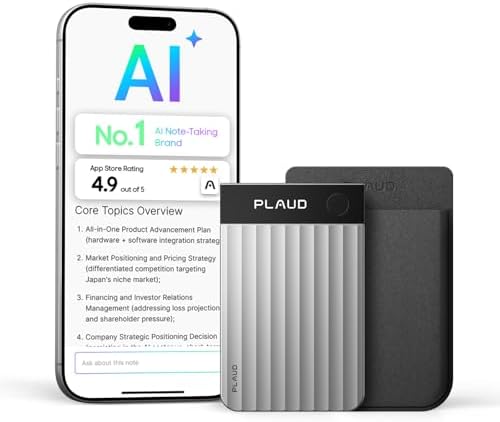
- Stay present in every scenario: Every conversation is covered, in person, on calls, and online. 4 MEMS + 1 VPU microphon…
- Walk out of every meeting with notes ready to act on: Plaud Intelligence transcribes in 112 languages with speaker label…
- AI summary ready before you reach your desk: Auto Transfer moves each recording to the Plaud app automatically, and Auto…
Plaud subscription costs: Starter is free (300 minutes a month). Pro is $8.33 a month billed annually or $17.99 monthly, with 1,200 minutes. Unlimited is about $20 a month billed annually or $29.99 monthly, with transcription up to 24 hours a day. Unused minutes don’t roll over.
Which AI note taker should you choose?
- You use Teams at work: Microsoft 365 Copilot, if your company already has Microsoft 365. Otherwise Fireflies or Otter both join Teams calls.
- You use Zoom: upgrade to Zoom Workplace Pro for AI Companion before paying for anything else.
- You want free: Fathom first, then Otter’s 300 free minutes or Fireflies’ free plan.
- You hate meeting bots: Granola.
- You’re in a mix of calls and in-person meetings: a Plaud recorder plus a free software note taker.
- You’re a researcher or student: Otter’s discount or Google’s NotebookLM for working with transcripts afterwards (see our Google AI and NotebookLM guide).
Tips for getting better AI meeting notes
- Name speakers early. Ask people to introduce themselves at the start so speaker labels are more accurate.
- Use a decent microphone. Poor audio is the biggest cause of bad transcripts.
- Check the summary before you share it. AI can mishear names, numbers and acronyms, so treat the summary as a first draft.
- Turn transcripts into action. Paste key points into a chatbot to draft follow-up emails. Our ChatGPT guide has prompt ideas.
- Set retention rules. Delete recordings you no longer need, especially if they contain personal data.
AI note taker FAQ
What is the best free AI note taker?
Fathom has the most generous free plan, with unlimited recordings and transcriptions plus instant AI summaries. Otter’s free Basic plan gives you 300 minutes a month, and Fireflies has a free plan with limited AI summaries.
How do I get AI meeting notes in Teams?
The built-in route is a Microsoft 365 Copilot licence, from £16.10 per user a month on an annual plan. Alternatively, Fireflies, Otter, tl;dv and Fathom can all join Teams meetings as a bot.
How do I get AI meeting notes in Zoom?
Zoom AI Companion is included with paid Zoom Workplace plans and gives you unlimited meeting summaries. The free Basic plan includes summaries for 3 hosted meetings a month. Third-party note takers also work with Zoom.
Can AI take notes in a face-to-face meeting?
Yes. Use a dedicated recorder such as the Plaud NotePin or Note Pro, or a device-audio app on your laptop or phone. Zoom’s My Notes also covers in-person conversations.
Is it legal to record meetings with an AI note taker in the UK?
Rules depend on the situation and your organisation’s policies, so check them first. As a minimum, tell everyone that the meeting is being recorded and transcribed, and explain how the notes will be used and stored.
Are AI meeting summaries accurate?
They’re usually a good first draft, but they can get names, figures and technical terms wrong. Always skim the summary against the transcript before sending it on.
Final thoughts
You don’t need to spend much to stop writing meeting notes by hand. Start with what you already have (Copilot in Teams or AI Companion in Zoom), try Fathom or Fireflies for free if you work across platforms, and add a Plaud recorder if many of your meetings happen in person. For a wider look at where these tools fit, see our round-up of the top AI platforms shaping 2026.